How to repeat your work and compare the results
You return to a result a few days later and want to answer a simple question: can I get the same result again? Start with the saved run, check what went into it and make a new run to compare.
This guide uses the training example from Train a model, but the same approach works for an analysis.
1. Recover the original setup
Open the reference run in Studio. Check What it ran with, Technical details and Files. Keep its input files, code revision, dependencies, settings and warnings together.
The current version of your project may have changed since that run. Ask the assistant to recover the recorded setup rather than substituting the latest one.
Read this saved run and identify the exact data, preparation, code, environment and settings it used. Tell me what you can recover and what is missing. Do not run anything yet.
If something is missing or inaccessible, record that gap. Recreating a plausible setup is a different task from repeating the original.
2. Decide what agreement means
Name the output you care about and how you will compare it. A matching score can hide different predictions; a matching endpoint can hide different curves.
For an analysis, you might compare included rows, a summary table and the plotted values. For training, check that the same rows were used for training and testing, then compare the learned model and each test prediction against the same sample.
In the practice example, we checked the learned line, all six test predictions and both error measures. The example download includes the precise numerical rule. For methods with randomness, ask what range of differences is reasonable and whether several repeats are needed.
3. Repeat without changing the recipe
Ask for a new recorded run using the same input and saved setup. Review the compute proposal before proceeding.
Repeat the exact saved recipe as a new Biosimulant run. Keep the original unchanged. Compare the retained output files using our agreed criterion, save both run links and report any differences.
For training, say that you want to train again from the saved data. Running predictions with an already trained model checks a different part of the work.
4. Inspect both runs
Select the completed runs and open Compare runs. Review the settings, plots and reported output differences. Open the output files when the comparison needs more detail than the summary shows.
Tap or click a screenshot to open it at full size.

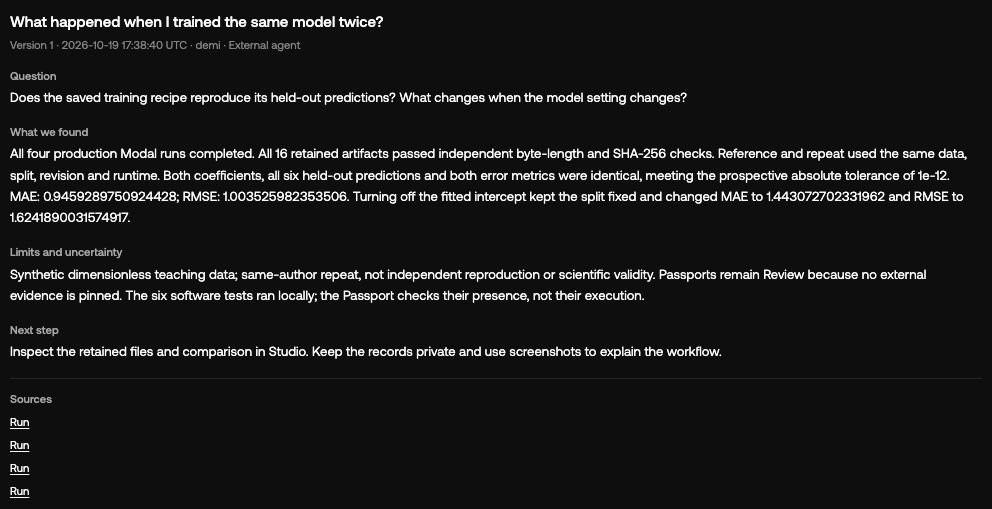
In the recorded teaching example, A is the reference and B repeats the same training recipe. Their learned line, all six test predictions and both error measures were identical. We checked the downloaded files as well as the displayed chart.
Ask the assistant to save a short comparison note: what was held fixed, what was compared, the observed differences and any remaining gaps. If only part of the result was checked, keep the conclusion limited to that part.
5. Change one thing deliberately
Once the repeat is understood, try a controlled change. Keep the reference and give the changed run a descriptive name.
In our example, C changes one training setting: it makes the fitted line pass through zero. The data and six test rows stay the same. The average prediction error rises from about 0.946 to 1.443, so that change made the predictions worse on these test rows.
For your own work, inspect the result before deciding that a change is an improvement.
For your own work, a new preprocessing step, training setting or code revision may be the useful next comparison. Record the reason for changing it alongside the result.
What you can conclude
Write down exactly what agreed and what you checked. Our example was repeated by the same author with the same teaching recipe. A colleague repeating it independently would be a separate check. Agreement also leaves you with the question of whether the method is right for the research problem.
You now have a record that helps with the next question: which data and setup produced this result, what happened when you repeated it, and what changed in the next attempt?